

You can improve Dock hiding in two ways.
Manually and with more adjustment capability, I show you how to do it in this article:
How to speed up the Dock on Mac and remove the delay when hiding it
Or if you prefer to do it more comfortably without having to touch the Terminal you can use TinkerTool, you can’t adjust as much but you can at least remove the annoying default auto-hide behavior.
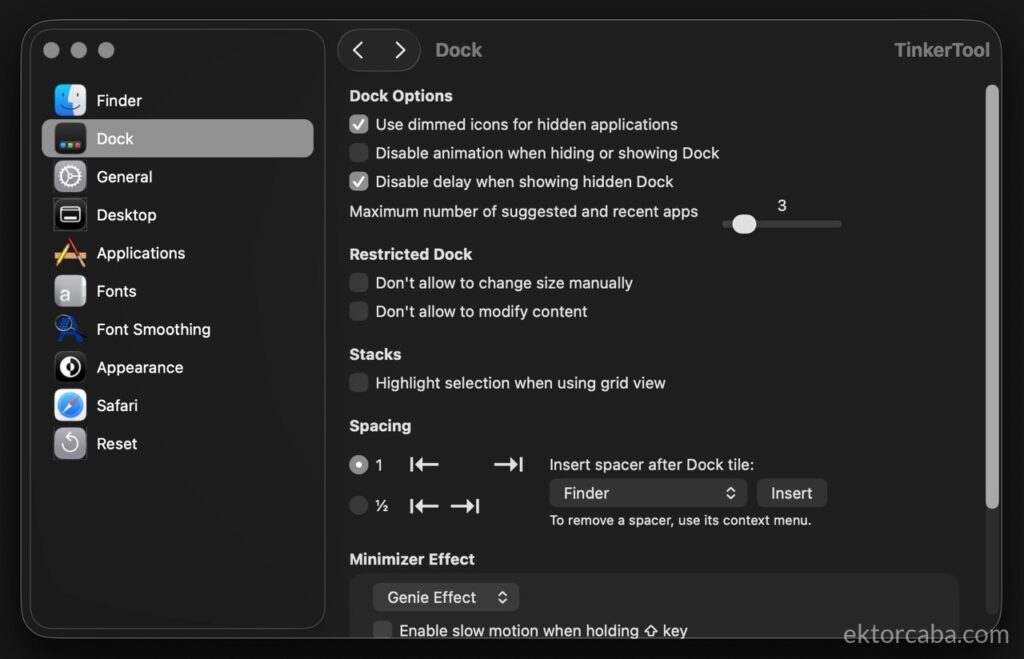
To do it with the app, download it for free from their website and install it, then when you open it accept the permissions, and on the left choose “Dock”.
Now in the options on the right, check the boxes:
- Disable animation when hiding or showing Dock
- Disable delay when showing hidden Dock
And click “Relaunch Dock” for the changes to apply, you can now close TinkerTool and enjoy your super fast Dock.
Even so, you can adjust a few more things, I’ll tell you how I have it set up on my system: